ChessCanvas

The connected chess improvement workspace

One Canvas.
Every Move Toward Mastery.

Analyze your games. Practise tactics by pattern. Explore millions of master games. Build your own Studies. Turn discoveries into deeper chess understanding — all in one connected workspace.

Free to start: one free account opens the whole Studio.

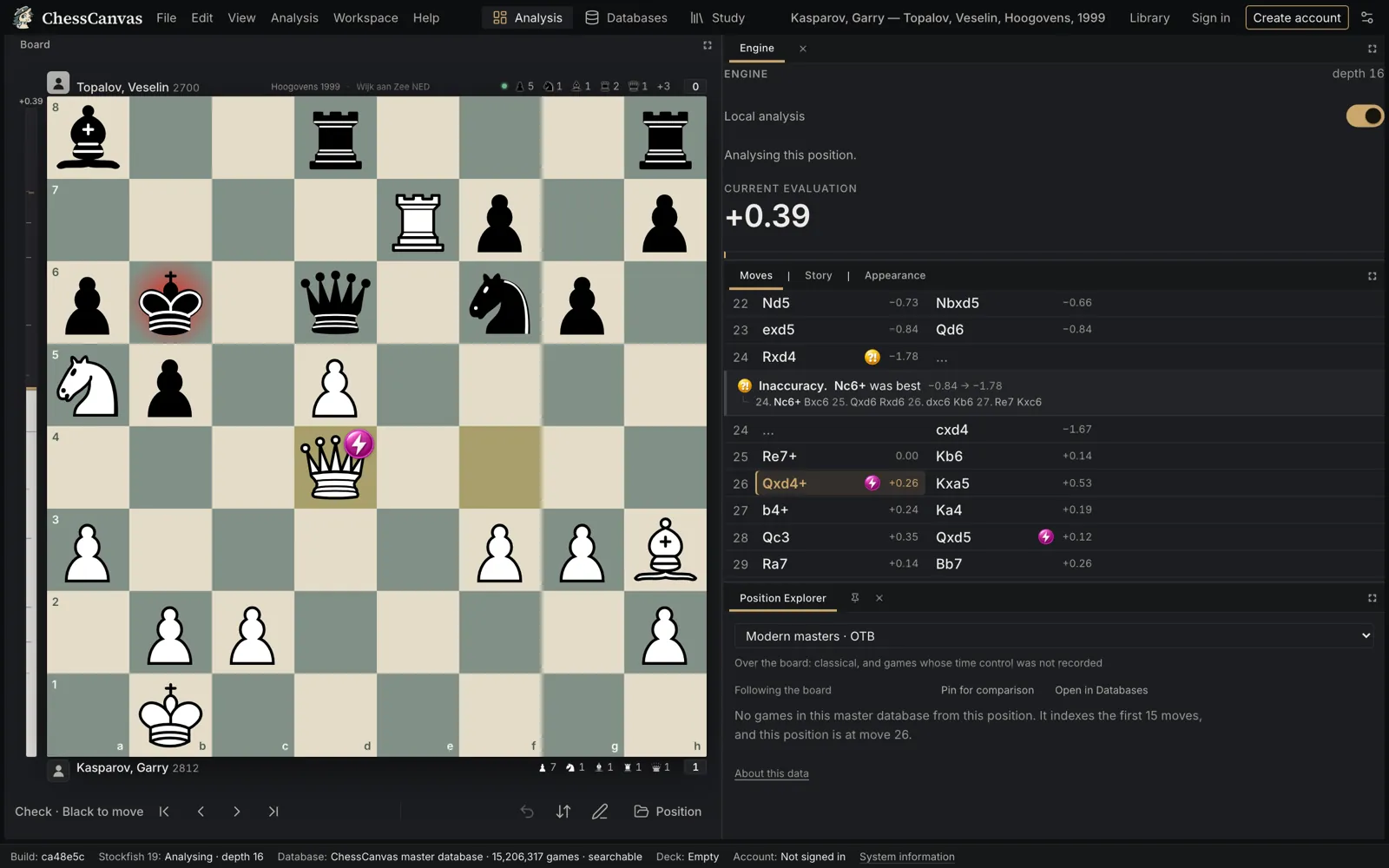
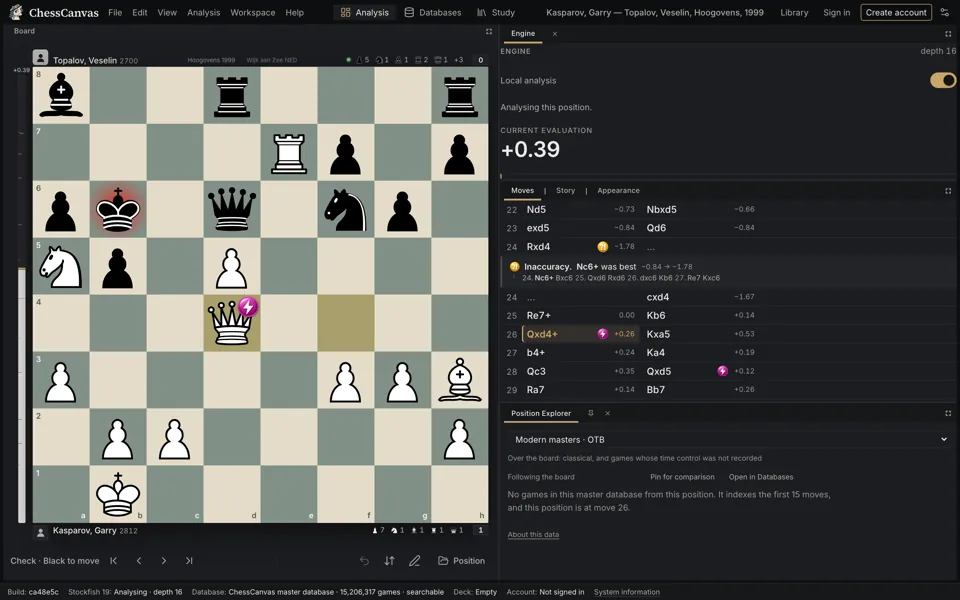
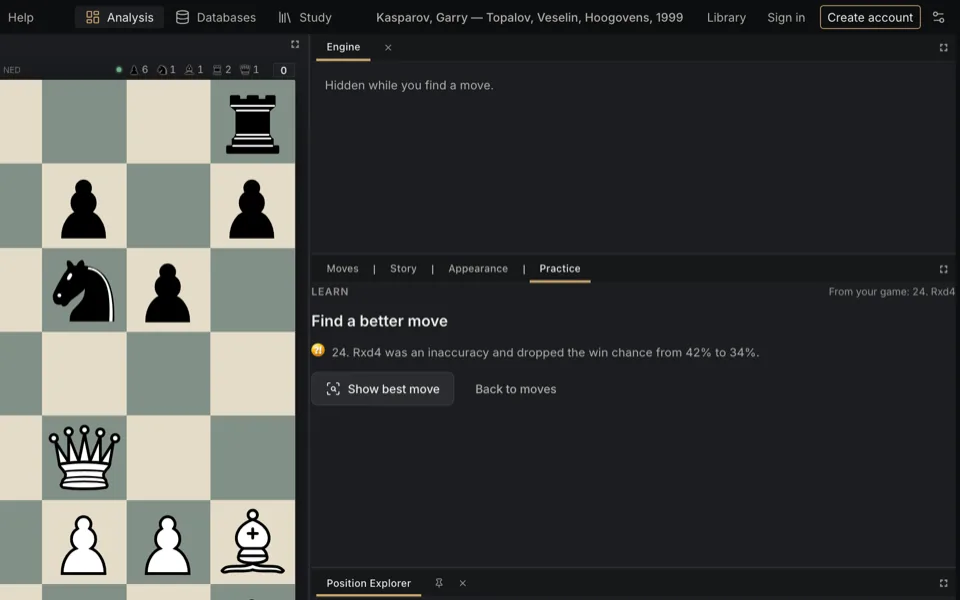
The ChessCanvas Analysis workspace with a reviewed master game: the board, the move list with classifications, the engine’s better line and the evaluation.
A reviewed master game in the Analysis workspace: every move classified, the better line one click away.
  • Stockfish 19Analysis on your own device
  • 15.2 million gamesIncluding 3.8 million over-the-board master games
  • Personal StudiesChapters, variations and comments
  • Free accountNo credit card, no trial clock

Your chess tools should work together.

You review a game in one place. Research its opening somewhere else. Save interesting positions in another tool. Eventually, the ideas you wanted to remember get scattered.

ChessCanvas brings analysis, master-game exploration and personal study into one connected environment, so you spend more time understanding chess and less time managing tools.

How ChessCanvas thinks about improvement

Seven stages. One improvement loop.

ChessCanvas gives the stages that happen at the board a home — and is honest about which ones are yours.

  1. Understand

    Discover why moves, positions and decisions work.

    Engine evaluation, variations, Game Review and your own comments.

    In the app
  2. Explore

    Investigate master games, positions, opening choices and alternatives.

    The 15.2 million-game database and the Position Explorer.

    In the app
  3. Build

    Organize discoveries into Studies with chapters, variations and comments.

    Studies, saved to your account.

    In the app
  4. Train

    Practice positions, test ideas and build familiarity.

    Tactics Lab puzzles by pattern, Retry the move you missed, Thinking Mode and Guess the Move.

    In the app
  5. Apply

    Carry what you learned into your games and tournaments.

    This part happens over the board, wherever you play.

    At your board
  6. Analyze

    Review decisions, find critical moments and inaccuracies, investigate alternatives.

    Import the game and review it with Stockfish 19.

    In the app
  7. Reinforce

    Return to your discoveries and deepen them over time.

    Reopen your Studies and Library whenever you choose.

    When you choose

In the appworks in ChessCanvas today At your boardwhat you do in your own games When you chooseno automatic reminders yet

How the workflow fits together

Use cases

Whatever you’re working on, start with a position.

A better opening. A confusing loss. A brilliant master game. A position worth remembering. ChessCanvas gives your chess questions a place to grow.

  • The ChessCanvas Analysis workspace with a reviewed master game: the board, the move list with classifications, the engine’s better line and the evaluation.

    After a game

    Understand the game you just played.

    Import a game from Chess.com, Lichess or a PGN, review every decision with Stockfish 19, find the moments that turned it and play out the moves you could have chosen instead.

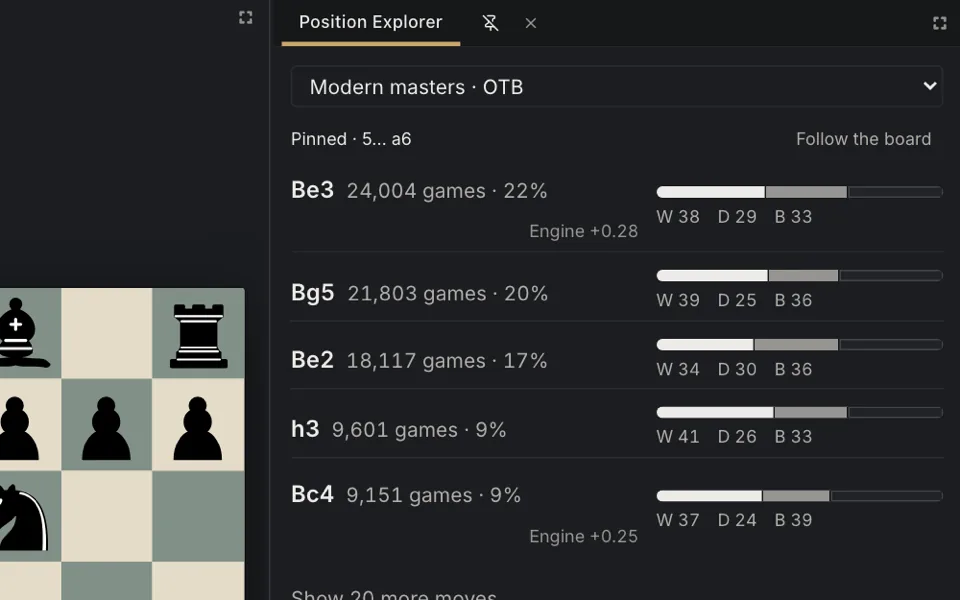
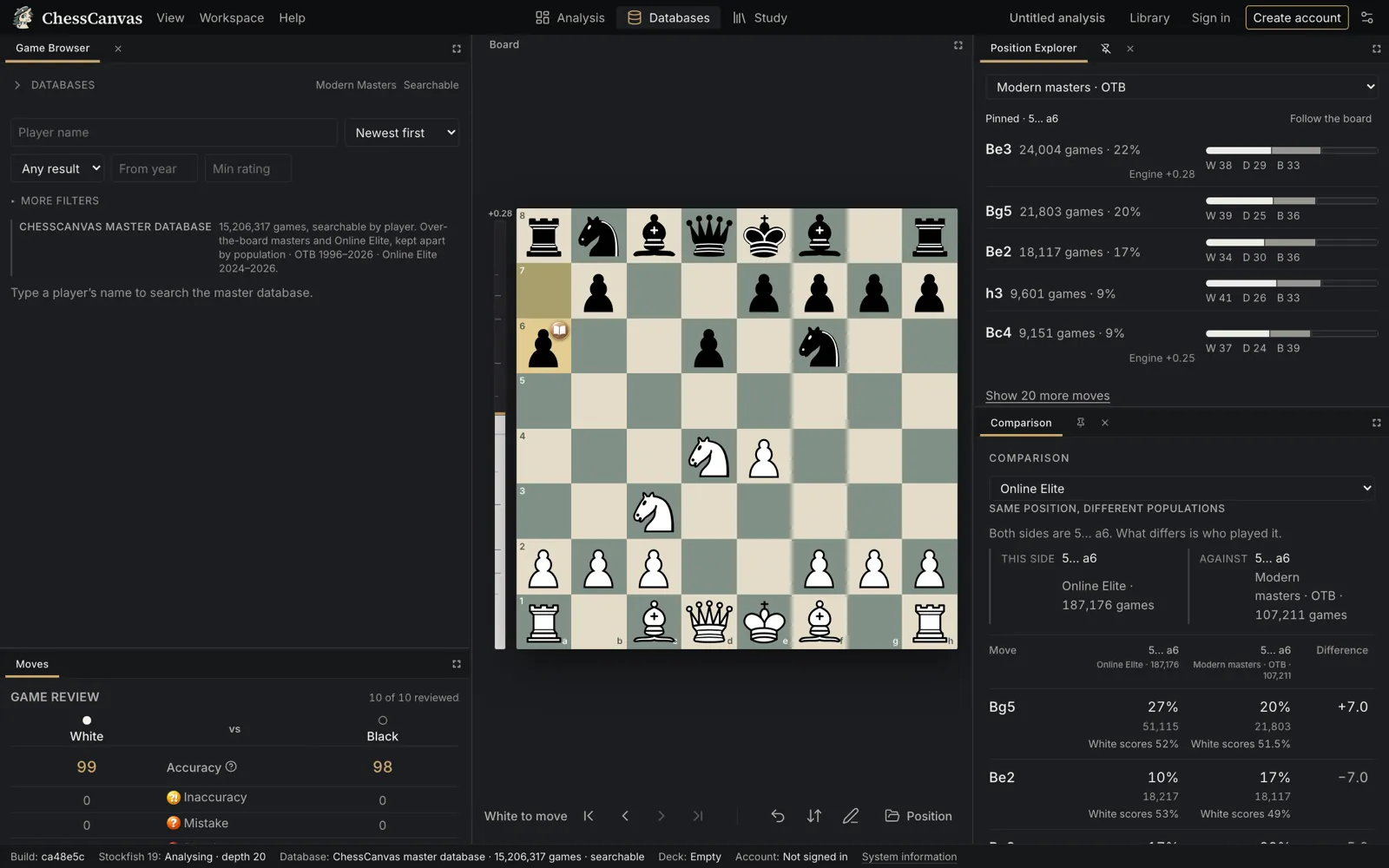
  • The Position Explorer: the moves played from the current position in master games, with how often each was played and how it scored.

    Before a game

    Prepare with evidence, not guesswork.

    See which moves strong players chose from your position and how they scored, open the games behind them and keep the useful lines in a Study.

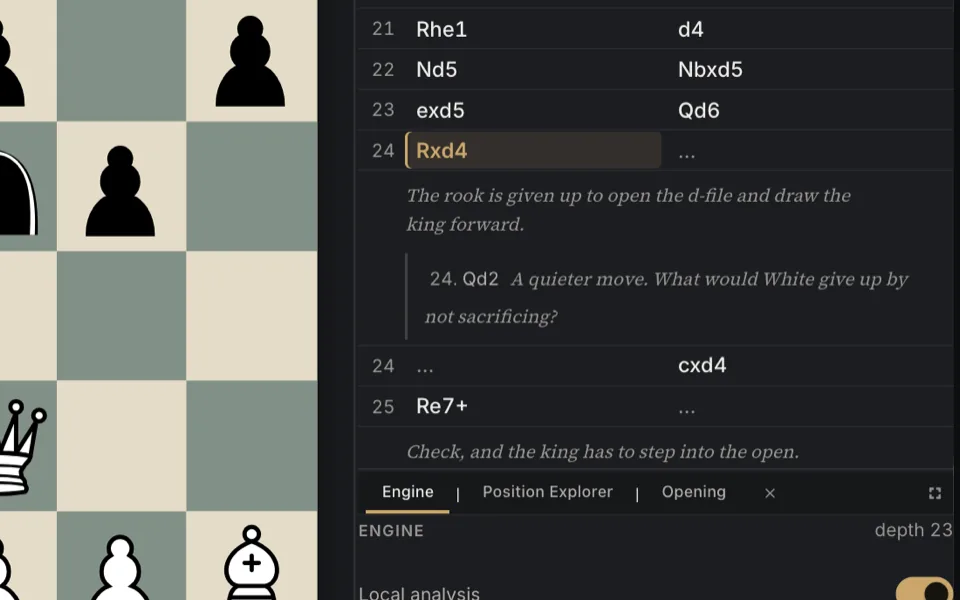
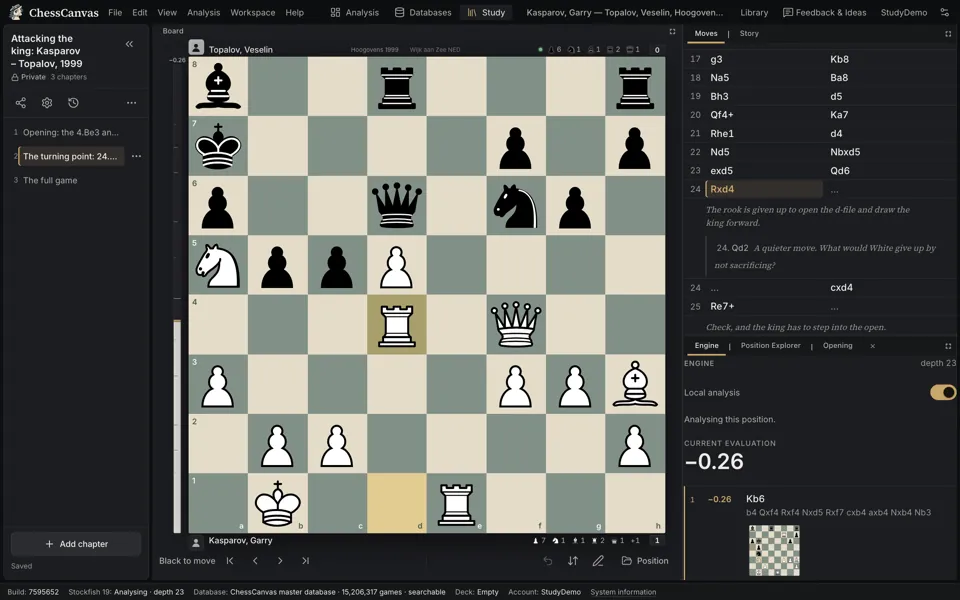
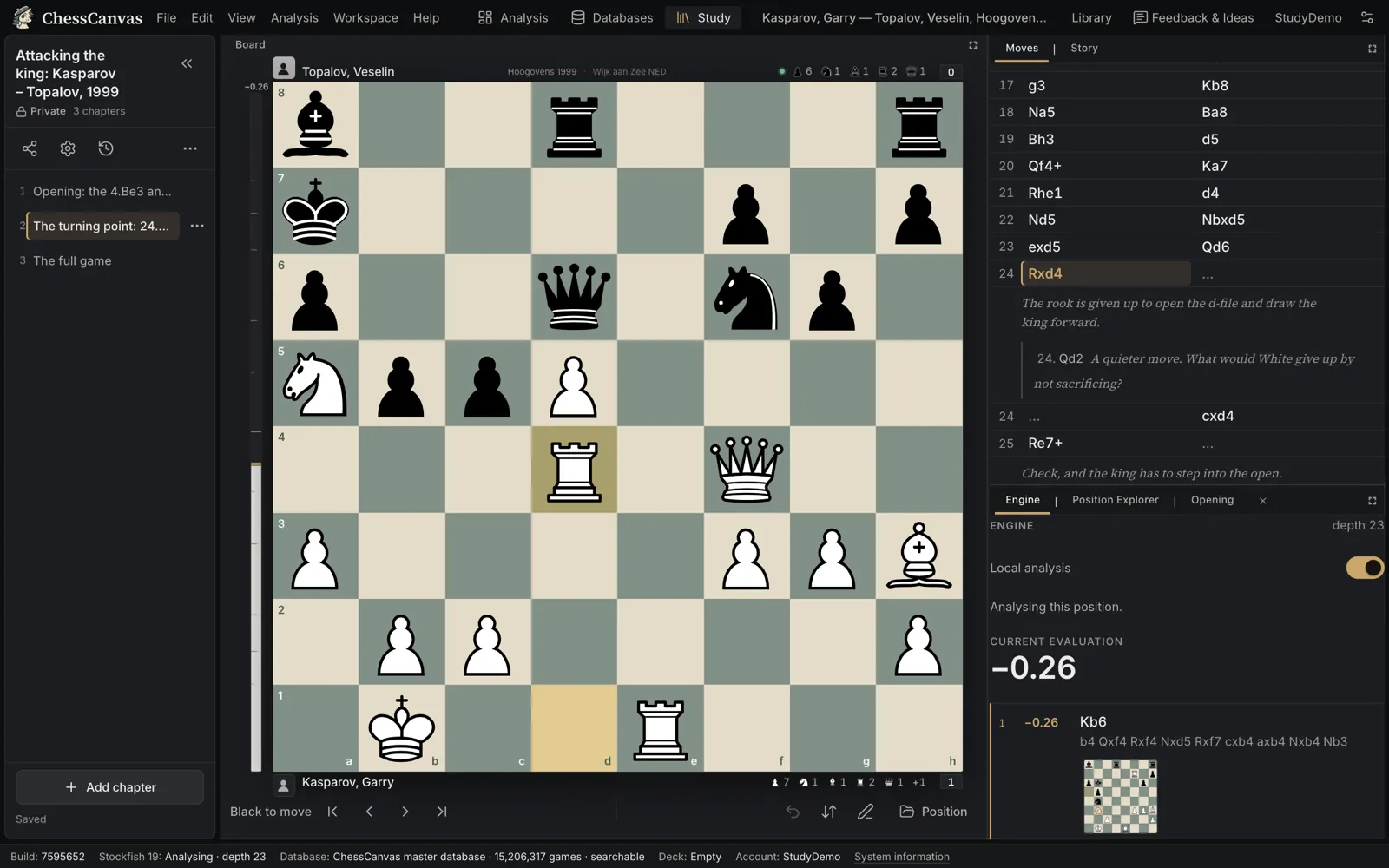
  • A ChessCanvas Study: chapters in the rail, a chapter’s moves with variations and comments, and the board.

    Your notes

    Turn good discoveries into knowledge you can revisit.

    Organize positions, variations, comments and illustrative games into Study chapters that grow with your understanding.

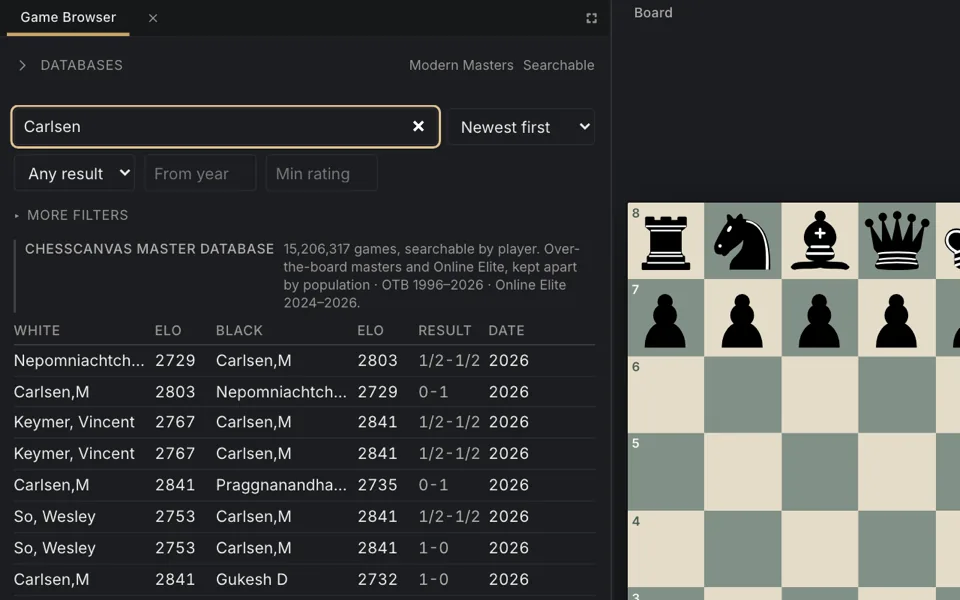
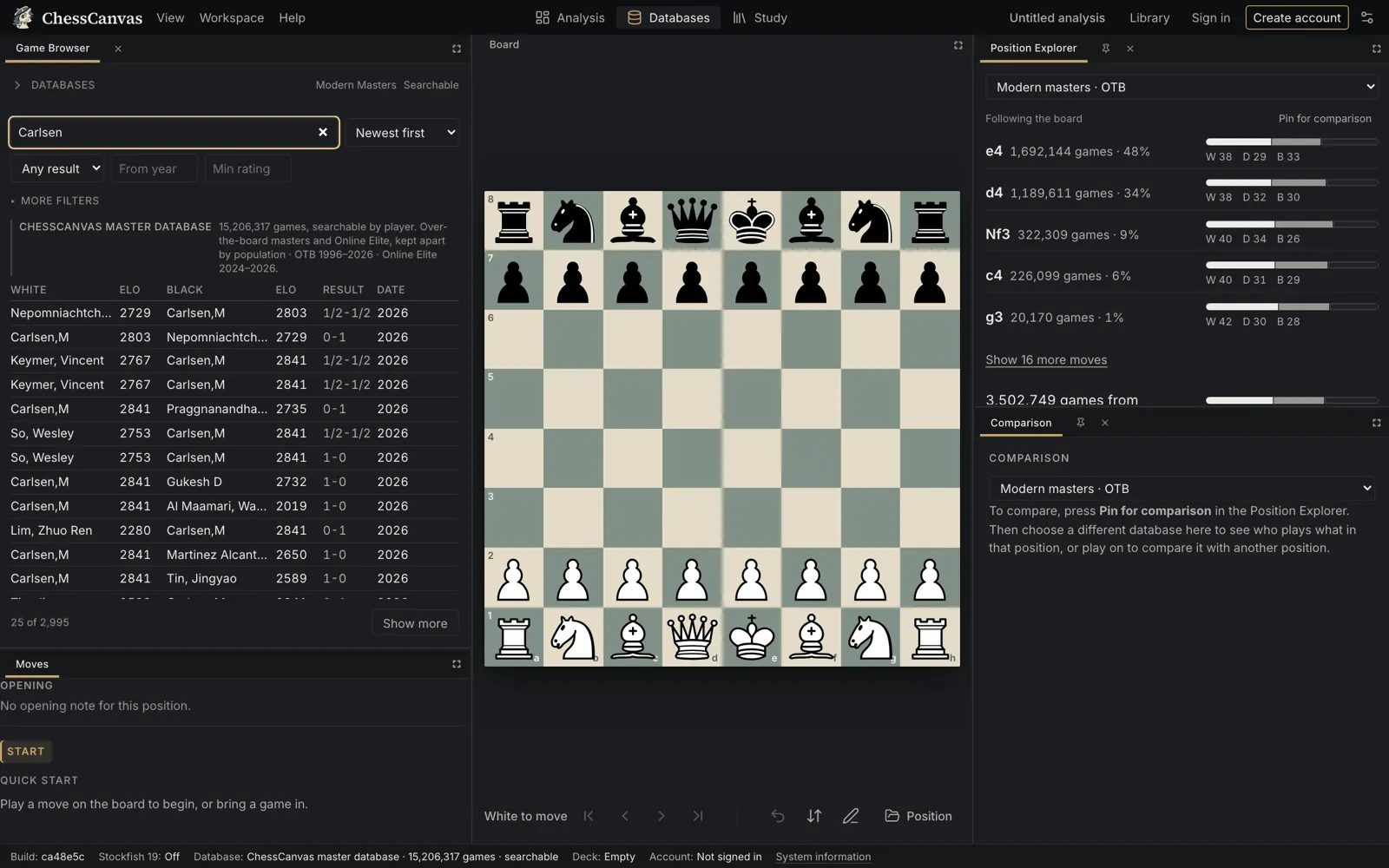
  • The Databases workspace: a player search in the 15.2 million-game database, with the results list beside the board.

    Learning from the best

    Study how masters handled your position.

    Search 15.2 million games by player, follow a position into the master games that reached it and see the plans behind each choice.

  • Retry this move in ChessCanvas: the reader is back at the position of a mistake, looking for the better move themselves.

    Your mistakes

    Don’t just find a mistake. Understand it.

    Game Review marks each move, shows the better line and lets you retry the moment yourself until the idea is yours.

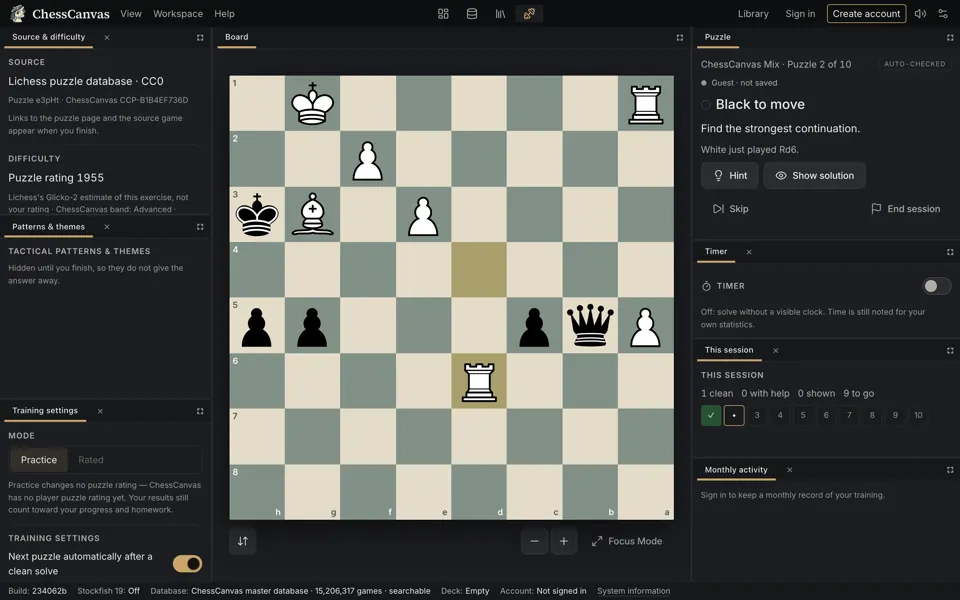
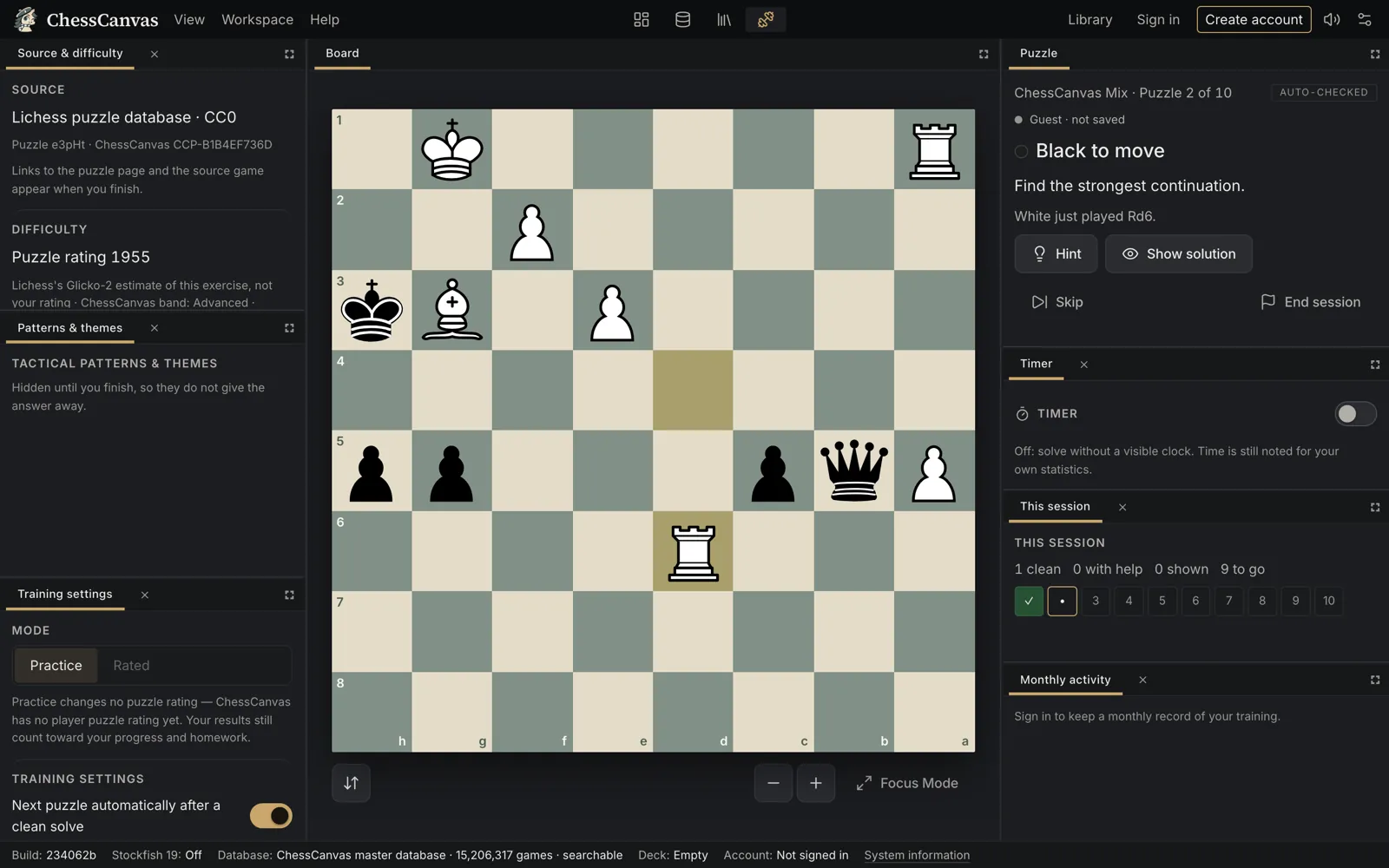
  • The Tactics Lab in a training session: the puzzle’s source and difficulty on the left, the board in the middle, the task, timer and session progress on the right.

    Tactics

    Recognize the pattern before the clock runs.

    Practise 1,139 puzzles from the Lichess puzzle database by pattern and difficulty, with hints, an optional timer and a recap that replays the ones you missed.

  • The Databases workspace: a player search in the 15.2 million-game database, with the results list beside the board.

    Tournaments

    Make your preparation more organized.

    Research the games and positions that matter for your next event, write your own notes beside them and return to the key variations before you play.

  • A ChessCanvas Study: chapters in the rail, a chapter’s moves with variations and comments, and the board.

    Coaches

    Give every important position a place.

    Build annotated Studies around instructive games, typical mistakes and meaningful variations, and share them with a link.

The software

Chess analysis, a master database and Studies — built to work as one.

Powerful game analysis

Stockfish 19 evaluates every position in your browser. Game Review classifies each move for both players, gives each side an accuracy score and shows the better line.

  • Lichess-compatible accuracy and thresholds
  • Play the engine’s line or retry the move yourself
  • Variations, comments and an evaluation timeline
Chess analysis in ChessCanvas
The ChessCanvas Analysis workspace with a reviewed master game: the board, the move list with classifications, the engine’s better line and the evaluation.

Explore 15.2 million games

Historical and modern over-the-board master games, plus the Online Elite collection, kept as separate populations. Search by player and narrow by colour, result, year and rating.

  • Over 3.8 million over-the-board and historical games
  • Open any game on the board in one click
  • Free with a ChessCanvas account
The ChessCanvas database
The Databases workspace: a player search in the 15.2 million-game database, with the results list beside the board.

Explore positions

The Position Explorer follows the board: what was played from here, how often, and how it scored — for the first 15 moves of every game. Pin one population and compare it with another.

Opening preparation
The Position Explorer: the moves played from the current position in master games, with how often each was played and how it scored.

Build personal Studies

Chapters, variations and comments, saved to your account. Start a chapter from your analysis, a PGN, a FEN or a master game, and export it as PGN whenever you like.

Chess Studies
A ChessCanvas Study: chapters in the rail, a chapter’s moves with variations and comments, and the board.

New · Tactics Lab

Recognize. Calculate. Master.

Tactical puzzle practice built around patterns. Train a ChessCanvas Mix or the patterns you choose, at the difficulty you choose, with hints, retries and an optional timer.

  • 1,139 puzzles from the Lichess puzzle database (CC0) in 9 of 17 patterns, each checked automatically
  • Sessions of 10 or 20, a recap, and one click to replay what you missed
  • With a free account: progress, a three-month activity calendar, pattern performance, goals and homework
  • Arrange the panels, resize the board or switch to Focus Mode
The Tactics Lab
The Tactics Lab in a training session: the puzzle’s source and difficulty on the left, the board in the middle, the task, timer and session progress on the right.

Import your games

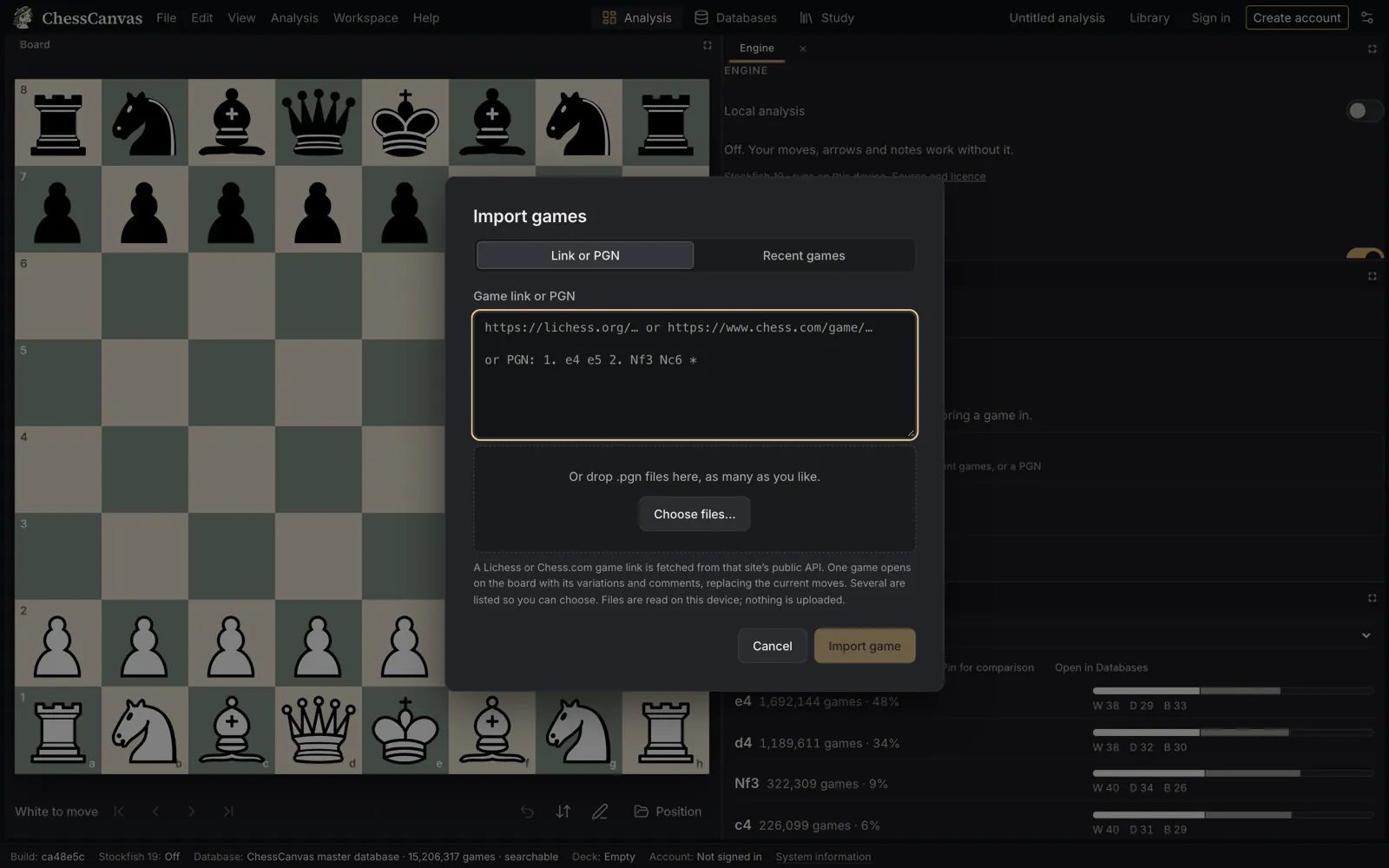
A Chess.com or Lichess game link, your latest games by username, or any PGN — pasted or dropped as a file. Positions come in as FEN.

Keep your work together

Your games and positions are kept in your Library on your device. Sign in and your Studies, and your imported Chess.com and Lichess games, are saved with your account.

The Import games dialog: a Chess.com or Lichess link, recent games by username, or PGN.

On your phone, too

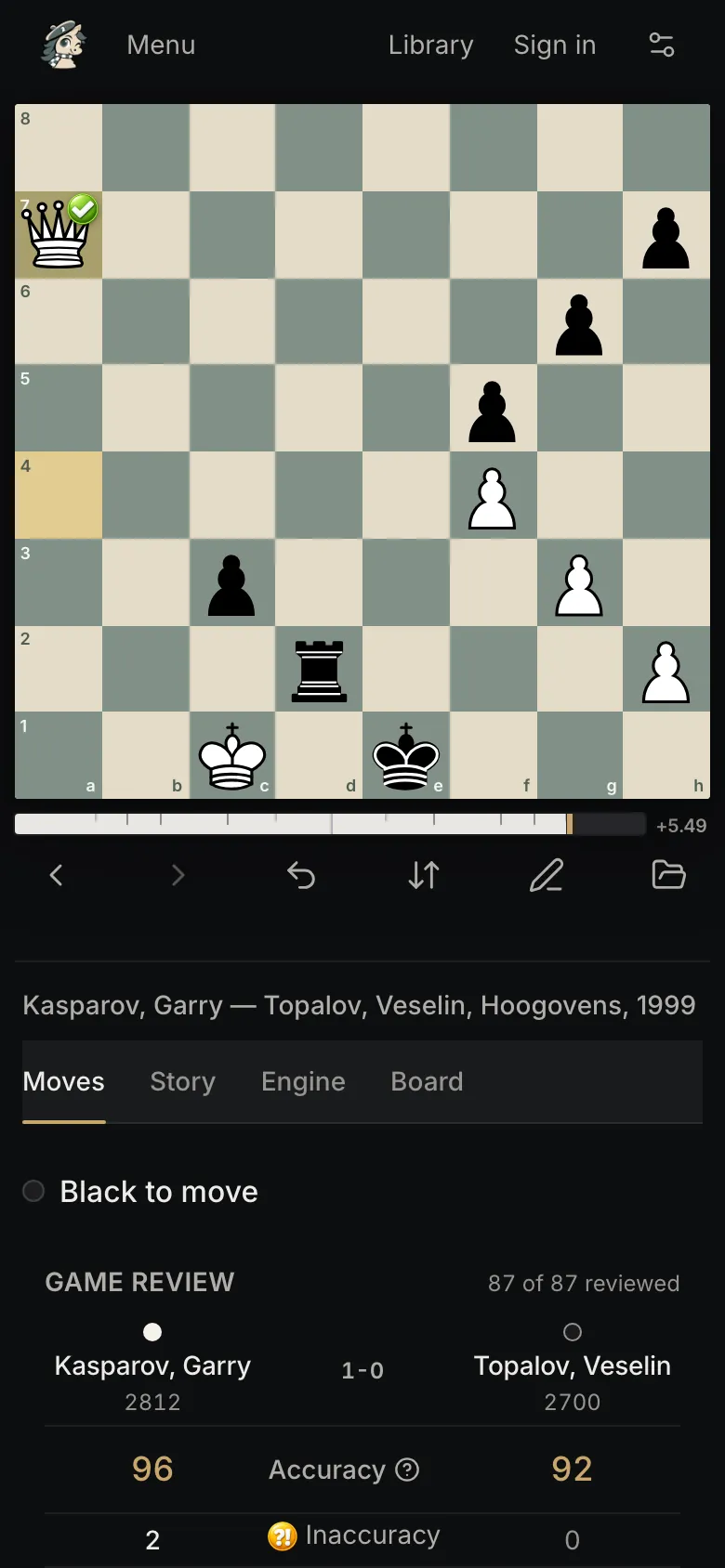
Analysis, Game Review and Studies have a phone layout with the board first and the review a tab away. Import a game on the way home from your tournament and review it there and then.

ChessCanvas on a phone: the board and the Game Review of a master game.

Who it’s for

Built for serious improvement — at every level.

  • Ambitious club players

    Understand your mistakes, investigate your openings and keep your improvement work in one place.

  • Tournament players

    Research positions, prepare variations and study the master games that reached them.

  • Chess coaches

    Build structured examples and annotated Studies for your lessons, and share them with a link.

  • Clubs and federations

    Use the same research and study tools to support structured chess education.

What you can check for yourself

Credibility you can verify.

  • Stockfish 19, on your device

    The open-source engine runs in your browser. Your games are not uploaded to be analyzed.

  • A real master database

    15.2 million searchable games, with every population kept separate and its source recorded.

  • Scoring you can compare

    Accuracy and move thresholds follow Lichess’s published method.

  • Secure accounts

    Sign-in and sign-up run on Amazon Cognito with e-mail verification.

  • Free, with one account

    Analysis, review, imports, the database, Tactics and Studies all come with a free ChessCanvas account.

  • No ads

    Nothing between you and the board. Questions go to a real inbox: support@parallax-motion.com.

ChessCanvas is proud to include a selectively curated collection of historical master games sourced with permission from The Week in Chess (TWIC).

From the ChessCanvas Blog

All articles

Questions

Is ChessCanvas free?

Yes. Analysis, Game Review, imports, the 15.2 million-game database, the Position Explorer, your Library and the training modes are free to use. Studies are free with a free account. There is no paid plan today.

Do I need an account?

No. ChessCanvas is free: create a free account (an email address and a password) and everything in the Studio is open to you: analysis, game review, imports, the master database, Tactics and Studies. Your Studies and imported Chess.com and Lichess games are saved with your account.

Can I analyze games from Chess.com or Lichess?

Yes. Paste a Chess.com or Lichess game link, load your recent games by username (up to 50), or paste or drop a PGN file. You can also set up any position from a FEN.

Which chess engine does ChessCanvas use?

Stockfish 19, running in your browser on your own device. Your games are not uploaded for analysis and there is no queue. Analysis speed depends on your device.

How does Game Review classify moves?

Each move is marked Theory, Best, As good as best, Sound, Inaccuracy, Mistake or Blunder, and exceptional moves can be recognized as Brilliant. Accuracy and the inaccuracy, mistake and blunder thresholds follow Lichess’s published method, so the numbers are comparable.

Does ChessCanvas have chess puzzles?

Yes. The Tactics Lab has 1,139 puzzles from the Lichess puzzle database (CC0) in 9 of the 17 tactical patterns ChessCanvas teaches. Every puzzle is replayed and checked automatically before it is offered; the pattern tags come from Lichess and are not individually reviewed by ChessCanvas. Training is free with a ChessCanvas account, which keeps your progress, goals and homework. Your results never change a rating: ChessCanvas has no player puzzle rating.

Can I create my own Studies?

Yes. A Study holds chapters; each chapter has its own moves, variations and comments. Start a chapter from a blank board, a FEN, a PGN, your analysis or another chapter, and export any chapter as PGN. Studies can be private, unlisted or public.

How many games can I explore?

15.2 million searchable games: over 3.8 million over-the-board and historical master games, and about 11.3 million games from the Online Elite collection, kept as separate populations. Search starts from a player name and can be narrowed by colour, result, year and rating; the Position Explorer covers the first 15 moves. Opening-code (ECO), event and time-control filters are not available yet.

Does ChessCanvas work on mobile?

Yes. Analysis, Game Review and Studies have a phone layout with the board first. The Databases workspace works on phones but is designed for larger screens.

How is ChessCanvas different?

It is designed around one connected workflow rather than separate tools: the game you review, the master games you look up and the notes you keep all work on the same board and the same position, so a discovery can go straight into a Study chapter.

Who makes ChessCanvas?

ChessCanvas is an independent project. It is not affiliated with Chess.com, Lichess or the Stockfish project; it works with their public game formats. Write to support@parallax-motion.com with questions or ideas.

This is where your chess work can live.

Free to start: one free account opens analysis, the master database, Tactics and Studies.

Already have an account? Sign in.